
Skip to product information
1 of 7

Nomadeos

Nomadeos

Regular price £158.00 GBP
Regular price Sale price £158.00 GBP
Sale Sold out
Shipping calculated at checkout.
Travel Cases
Color: Vert

Import duties and taxes are not included.

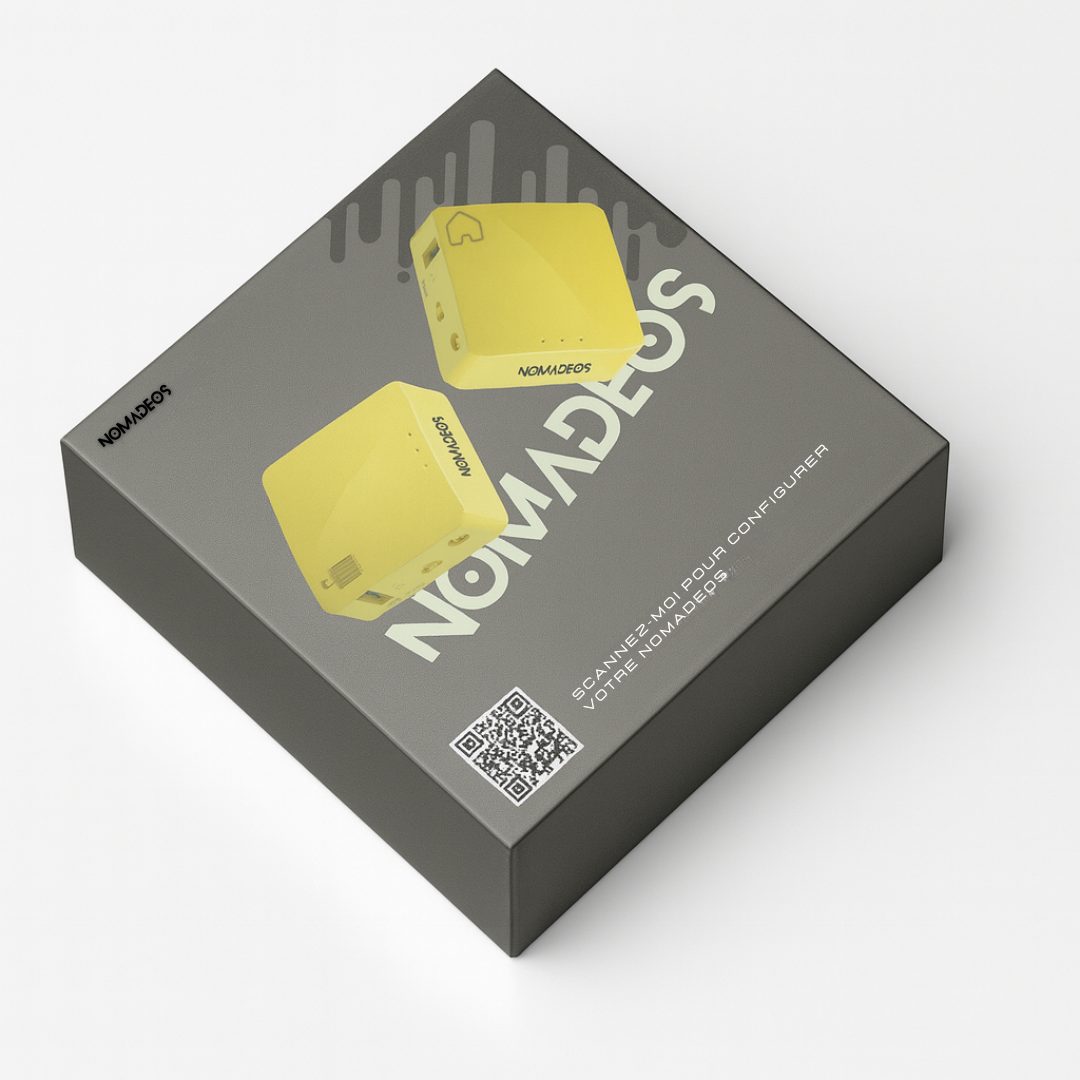
Nomadeos allows you to connect to the internet as if you were at home, even abroad, by keeping your home IP address. One device must remain connected to your home internet box, and the second must be connected to a local internet connection (Wi-Fi or Ethernet) wherever you are.

Features

Ports: 1 WAN, 1 LAN, 1 USB 2.0, Micro USB (power)
Buttons: Reset, Toggle
LED indicators: Power / Wi-Fi
CPU: QCA9531 @ 650 MHz – OS OpenWRT
Memory: DDR2 128 MB – NAND Flash 128 MB Storage
Wi-Fi: IEEE 802.11 b/g/n (2.4 GHz)
Ethernet: 10/100 Mbps
TX Power: < 20 dBm
Power Supply: 5V / 2A (Micro USB)
Power Consumption: < 2.75 W
Temperature: Operating 0 ~ 40 °C | Storage -20 ~ 70 °C
Dimensions / Weight: 58 × 58 × 25 mm – 40 g

View full details

Is it undetectable?

With Nomadeos, websites never see your foreign address

When you're abroad, if you don't use Nomadeos, your local connection will betray you. The sites and services you use will detect your connection location.

A man in a suit jacket and swim trunks, lying on a deckchair, checking his phone

With Nomadeos, only one address stands out: your home address.

It is neither a shared address, nor an address rented from a service provider. It is the one your operator has assigned to your line, exactly as if you were at home.

No VPN signature

Traditional VPNs use data center IP addresses, which are listed in public databases. This is why banks and streaming platforms block them. Nomadeos does not use any.

Even if cut, nothing leaks

If the connection between your two boxes is interrupted, the connection is immediately severed rather than switching to the local network. Your foreign address is not exposed, not even for a fraction of a second.

From any country

Nomadeos works everywhere in the world, in both directions.

Your home, wherever it is


You plug the home unit into your internet box, in the country where you live. All you need is access to that box to authorise pairing.

Your travels, anywhere


You take the travel unit with you and get your usual connection back, with your home IP address, in any country you visit.

One caveat: a few countries that heavily filter internet traffic, such as China or Russia, may block access.

How it works

Two units, one single IP address

Your internet box gives you an IP address, and that address is what shows where you are. Nomadeos simply makes yours travel with you.

The Nomadeos Home unit, green, marked with a house

Your home

The Home unit stays plugged into your box and copies its address.

88.120.•••.•••
Private link
The Nomadeos Travel unit, green, marked with a suitcase

Wherever you are

The Travel unit follows you and broadcasts that same address.

88.120.•••.•••

The same address at both ends. That is the one everyone sees.

If anyone checks, you are at home

Everyone sees your home address, and therefore locates you at home.

100% compatible

Compatible with everything you already use

Nomadeos sits upstream of your devices. Nothing changes for them, and nothing needs changing on your work equipment.

Nothing to install on your work computer

Your computer only sees an ordinary internet box. No software to install, no settings to change, no cable to plug into it. The unit powers itself, from a wall socket, a phone charger or a power bank.

All your devices, over Wi-Fi or by cable

Computer, phone, tablet, console, TV. Whatever the operating system, with nothing to configure on the device. Connect over Wi-Fi or by Ethernet cable, as you prefer.

Your company tools keep working

Corporate VPN, proxy, email, business applications: Nomadeos does not replace them, it sits in front of them. Your company VPN connects through it, exactly as it would from your home.
After your purchase

You are not on your own once the box arrives

4,81 sur 5 203 verified reviews
Quick to set upA video tutorial and a PDF guide for your provider
A human answers you, not a botNomadeos technicians, Monday to Friday, 9:30 am to 7 pm
More than 10,000 usersNomadeos has been proven in the field for years

FAQ

I don't live in France, can I still use Nomadeos?

Yes! Nomadeos works everywhere in the world! All you need is access to your internet box at home, no matter which country you are in, to authorize the device.

Is it complicated to install?

No. Nomadeos is pre-configured before shipping. You just need to plug it into your Internet box at home once, following our ultra-simplified guide. And if needed, our team will help you remotely, free of charge.

Does it work on 4G?

Yes! If you have 4G on your mobile, simply connect your mobile to the box to share the connection, then connect to the box with your work PC

Will I have access to all my work tools?

Your PC will consider that you are connected from your home. You will therefore have access to the same tools as if you were at home, connected to your router

What's the difference compared to a standard VPN?

To begin with, in most cases it's impossible to install a VPN on your work computer due to restricted machine rights and the presence of a corporate VPN).

Furthermore, even with a VPN installed on your phone, when sharing a 4G connection, only the phone is covered by the VPN. Any device connected to your phone does not benefit from the VPN.

If you don't have a corporate VPN and you have installation rights on your machine, we still recommend using a Nomadeos.

Indeed, unlike traditional VPNs that route through third-party servers, Nomadeos connects you directly to your home internet box. The result:

✔️ You comply with telework regulations (your IP remains 100% that of your home).

✔️ Your sensitive data (banking, professional, etc.) never passes through external servers.

✔️ You can share a single paid connection (hotel, airplane) with all your devices.

✔️ Only one purchase → no monthly or annual subscription: you save from the 1st year.

How to configure Nomadeos?

The user manual is available by scanning the QR code on the Nomadeos packaging

Is it compatible with my carrier?

The Nomadéos is compatible with all fiber and ADSL internet providers

Is this compatible with my corporate VPN?

Yes! The Nomadeos should be considered a standard Wi-Fi hotspot. All the technical aspects are handled within the device itself. As far as your computer is concerned, you are connecting to your home Wi-Fi hotspot.

Can I use it on my work computer

Exactly! The advantage of Nomadeos is that it requires no installation or manipulation on the professional PC. Once Nomadeos is configured, all you have to do is connect to your Nomadeos as if you were connecting to your internet box.

What types of connection can I share with Nomadeos?

All types of connection are possible:
Wi-Fi connection, internet box, 4G connection sharing, 4G modem, 4G dongle, etc.

Can I connect to devices on my local network?

yes, you can connect to your local network devices (NAS, web servers, cameras, etc.) from anywhere

An enterprise VPN isn't enough to hide my location?

Quite the opposite. In most cases, a corporate VPN allows your employer to monitor network traffic in more detail. Indeed, using the management tools at their disposal, the employer can easily monitor the IP addresses entering the VPN. They can even set up an alert when a suspicious IP (outside France, outside the employee's home, etc.) connects to the VPN. Nomadeos ensures that the IP entering the corporate VPN matches your home IP address in France.

Can I connect more than one travel router to my home network

Yes, the multi-pack allows you to connect two boxes to your home network and thus enjoy Nomadeos with multiple people without being in the same place, or even connect different sites to your local network

How does it work?

1️⃣ The Nomadeos Server (at home)

  • Connects to your internet box.
  • Provides your home's IP address.
  • Stays on while you're away.

2️⃣ The Nomadeos Client (while traveling)

  • Connects via Wi-Fi to any network (hotel, slow ADSL, coworking, 4G, etc.).
  • Creates a secure tunnel to your router in France.
  • Your computer sees the internet as if you were at home.

3️⃣ Result

  • You browse the internet with your personal French IP address, not that of your current country.
  • You can access your bank accounts, administrative documents, TV, corporate IP whitelisting, etc.

Nomadeos is not intended to bypass corporate cybersecurity systems.
Do not use Nomadeos if its use violates your company's or organization's policies.

Does it work with Starlink or 4G/5G boxes?

Case 1 – Starlink / 4G / 5G at the destination (where you are connecting from)

No problem

You can be connected to:

  • Starlink
  • a 4G / 5G box
  • a public or private Wi-Fi network

Nomadeos connects normally, and you retrieve your home IP address, as if you were at home.

Case 2 – Starlink / 4G / 5G at the source (where the "home" router is connected)

👉 Also works, but differently.

In this case, Starlink / 4G / 5G connections generally use CGNAT, which prevents a classic direct connection.

Nomadeos then routes through the Nomadeos server infrastructure (secure relay).

Consequence:

  • The service remains functional
  • But additional charges may apply (due to server infrastructure usage)

Does it work in every country?

The Nomadeos works in almost the entire world.

The Nomadeos can also be used as a home router anywhere in the world.

However, some countries such as China, Russia, or Egypt, with very restrictive internet traffic policies, may block access to the Nomadeos.